
Sphinx AI Meeting Transcription Solution: From Audio Recordings to Formal Meeting Minutes
A two-hour staff meeting can leave a secretary with half a day—or even a full day—of work: replaying the recording, typing every statement, checking speaker names, and formatting the minutes to meet the organization’s official requirements. By the time the minutes are signed, some decisions and directives may already be overdue.
Sphinx’s AI-Powered Transcription System is meeting transcription solution developed by Sphinx JSC as part of its Voice AI ecosystem and S-visor platform. It automatically converts Vietnamese speech into text, separates speakers, summarizes key points, and prepares draft minutes using the organization’s administrative template. People retain final control through built-in review and approval workflows.
Why Is Manual Meeting Transcription Becoming a Bottleneck?
For government agencies, banks, and large enterprises, meeting minutes can be formal records and a basis for assigning and tracking work. Yet common manual processes still have several limitations:
- Time-consuming: Transcribers must replay sections repeatedly, especially when participants interrupt one another or speak quickly.
- Prone to errors: Speaker names may be confused, figures may be incorrect, and key directives may be missed. Comparing the text with the original audio is often difficult.
- Difficult to coordinate: A long meeting is often handled by one person, rather than divided into sections that multiple reviewers can process in parallel.
- Hard to search: Recordings may be scattered across personal computers, making it necessary to replay much of the meeting to find a particular decision.
- General-purpose AI tools may not be suitable: Internal meeting data may be uploaded to external servers, while personal data protection requirements and Vietnam’s Law on Artificial Intelligence, effective from 1 March 2026, place increasing emphasis on data control and human oversight.
Sphinx meeting transcription software is designed to address all five challenges.
A Five-Step Workflow: AI Handles Repetitive Tasks While People Ensure Accuracy
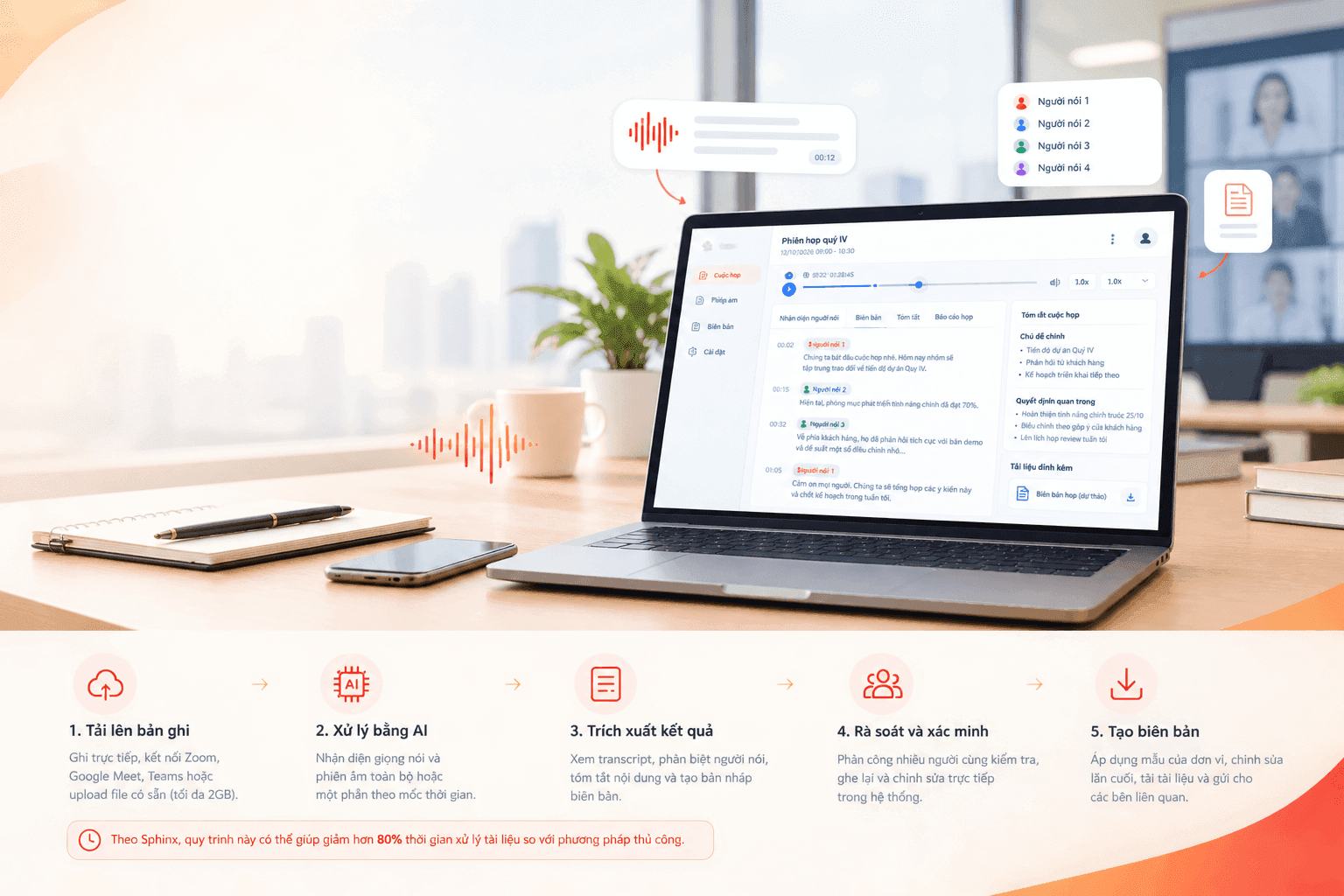
Every recording follows the same five-step workflow, displayed in a progress tracker:
- Upload the recording: Record directly through a microphone, connect to Zoom, Google Meet, or Microsoft Teams, or upload an existing audio file of up to 2 GB.
- AI processing: The system recognizes speech and transcribes the entire recording or only a selected section of the timeline.
- Extract the results: View the transcript with timestamps, speaker identification, a summary, and a draft meeting report.
- Review and verification: A review lead assigns sections to multiple reviewers, who listen to the audio and edit the transcript directly.
- Generate the minutes: Apply the organization’s approved template, make final edits, download the document, and send it to relevant stakeholders.
According to Sphinx, this workflow can reduce document-processing time by more than 80% compared with manual transcription.
Record Meetings Live or Upload Existing Audio
When creating a meeting, users enter its name, date and time, meeting room, and participant list, assigning roles such as Chair, Secretary, Technical Support, Member, or Guest.
The system supports two ways to provide audio:
- Select an audio source: The system records throughout the meeting through a microphone or via Zoom, Google Meet, or Microsoft Teams, then attaches the recording to the meeting automatically when it ends.
- Upload a file: For meetings that have already taken place, users can drag and drop MP3, WAV, and other common formats into the system.
A meeting can be linked to multiple recording rooms running in parallel, making the system suitable for online meetings with participants joining from multiple locations.
Real-Time Transcription for Live Meetings
In live recording mode, spoken content is converted into text and displayed on screen while the meeting is underway. Reviewers can immediately correct the transcript and compare it with the original recording without waiting for the meeting to end.
Detailed Transcripts with Timestamps and Speaker Identification
After AI processing, the Extraction screen presents the transcript by speaker. Each segment includes a timestamp and a button to replay the corresponding audio.
The screen contains four tabs, each designed for a specific purpose:
- Speaker identification: AI separates different voices. Users can replace labels such as “SPEAKER_1” and “SPEAKER_2” with real names, and the changes are applied throughout the transcript.
- Transcript: View the full conversation in chronological order using the integrated audio player, which supports seeking, playback-speed adjustment, and volume control.
- Meeting summary: AI identifies the meeting’s topics, rationale and objectives, discussion points, and key decisions, helping leaders understand the outcome without reading the entire transcript.
- Meeting report: Generate a draft using the organization’s administrative template and edit it directly before exporting.
Transcripts can be downloaded in two formats: a full version containing speaker labels and each speaker’s dialogue, or a condensed version containing the meeting transcript as a whole.
In Sphinx’s internal testing, the speech-recognition engine achieved approximately 94.9% accuracy for Vietnamese. It is optimized for regional accents, specialized terminology, and unstable audio signals.
Multi-Person Review and Side-by-Side Approval
This is a key distinction between Sphinx’s system and general speech-to-text applications. AI can mishear words, but official meeting minutes must be reliable. That is why the platform includes a dedicated review workflow.
Assign work in parallel. A review lead divides a long recording into sections, assigns each section to a reviewer, and sets a deadline.
Work in a dedicated workspace. Each reviewer sees only the recordings assigned to them in the “Workspace” area. They listen to the original audio alongside the AI-generated text, edit individual sentences, and submit their work.
Compare and approve. The approver opens a two-column view: the AI-generated original appears on the left, and the reviewed version appears on the right. The approver can combine edits from multiple reviewers, make further changes, and use full-screen mode for long recordings before selecting “Approve.” If the quality is insufficient, the transcript can be rejected for revision.
This side-by-side verification process supports the principle of human oversight for important decisions under AI governance requirements.
Generate Formal Meeting Minutes in One Click
Once the content is approved, users select “Generate Minutes.” The system creates a document using the organization’s approved template, with fields for the official heading, date and time, location, attendees, discussion, and conclusions. Users can make final edits, download the document, and complete the workflow. The finished minutes are emailed to relevant officers and staff.
Administrators can upload multiple templates for different document types, including meeting minutes, reports, and decisions, for each organization.
Replacement Dictionary: Teach AI Your Organization’s Terminology
Every organization has abbreviations, specialist terminology, and proper names that general-purpose AI systems may misrecognize. The Replacement Dictionary lets users define “incorrect term → correct term” pairs- for example, to correct a regional pronunciation or expand an abbreviation such as “CCCD” to “Citizen Identity Card.” The system then applies these corrections automatically in subsequent transcription tasks.
Dictionary entries can be added individually or imported in bulk using a CSV template.
Granular Access Controls and an Executive Dashboard
Each account is assigned a role when it is created. The role determines which workflow stages the user can access and what actions they can perform:
- Administrator: Can view the entire workflow, approve content, and replace files.
- Secretary: Can track the process from AI analysis through meeting-minute generation.
- Reviewer: Works only at the review stage and is the only role authorized to edit reviewed content.
- Technical Support: Handles the file-upload stage only.
- Meeting participant: Can view the extracted record for meetings they attended.
The system includes seven predefined roles and supports custom roles with specific permissions.
The executive dashboard tracks meeting counts, recording duration, AI processing time, and completion rates. Managers can filter results by organization, department, and time period, then export a report with one click.
Who Is This Meeting Transcription Software For?
- Government offices and public agencies: For staff meetings, conferences, and question-and-answer sessions that require properly formatted minutes and long-term records.
- Banks, insurers, and large enterprises: For board meetings, risk committees, credit meetings, and other settings with stringent confidentiality and audit-trail requirements.
- Multi-branch organizations: For hybrid meetings combining in-person and online participants across multiple locations.
For teams that only need a quick transcript without a review workflow, the system also offers Audio File Management. Users upload a file, select “AI Analysis,” and receive a transcript.
The transcription system runs on Sphinx’s S-visor platform and may be deployed on-premises using an organization’s own infrastructure. This option may suit organizations that require meeting data to remain within their internal environment.
Frequently Asked Questions
Which file formats does Sphinx meeting transcription software support?
The system supports common audio formats such as MP3 and WAV, with a maximum file size of 2 GB. It can also record directly through a microphone or via Zoom, Google Meet, and Microsoft Teams.
Can AI identify speakers correctly?
AI separates different voices in the recording. Users can assign each speaker’s real name once, and the name is updated throughout the transcript.
What happens if the AI transcript contains errors?
The transcript goes through a review stage. Reviewers listen to the original audio and make corrections, while approvers compare the original and reviewed versions side by side. Recurring errors can be added to the Replacement Dictionary so the system can correct them in future transcription tasks.
Can we use our organization’s own meeting-minute template?
Yes. Administrators can upload templates for meeting minutes, reports, or decisions in the organization’s required format. The system then generates documents based on those templates.
Conclusion
Faster meeting minutes mean that decisions and directives can be acted on sooner. Sphinx’s AI-Powered Transcription System does not replace the secretary. Instead, it takes on the most time-consuming repetitive tasks, allowing people to focus on quality control and decision-making.